시작하며
안녕하세요, Riiid R.inside 백엔드 엔지니어 마주환입니다. 최근 새로운 B2B 프로젝트를 진행하게 되면서 프로젝트들을 재구성해야 하는 기회가 생겨 Spring Security OAuth2 Authorization Server 라이브러리를 사용하게 되었는데 이 과정에서의 제 경험과 생각이 도움이 된다거나 인증 서버에 관심 있으실 분들을 위해 본 포스팅을 작성하게 되었습니다.
Spring Security 커스터마이징 구현 배경
Spring 버전 업데이트의 고충
Spring boot 3.x 버전이 출시된 이후에도 여전히 실무에서는 Spring 2.x 버전이 주를 이루고 있습니다. 아무래도 버전 업데이트는 실무자 입장에서 꽤 골치 아픈 일인데, 주로 아래의 이유로 업데이트를 기피하고 있습니다.
하지만 저는 새로운 프로젝트를 앞두고 Spring boot 2.x의 지원 기한이 얼마 남지 않기도 했고, 관성에 이끌려서 2 버전으로 개발하게 되면 결국 기술 부채만 늘리게 되는 게 아닌가 싶어서 새로운 프로젝트는 kotlin 1.8.21 + spring boot 3.1.2 + JVM 17로 진행하기로 했습니다.
Riiid의 B2B 프로젝트 경우에는 사용자 인증을 위해 Spring security를 이용하여 Authorization server를 별도로 운영하고 있습니다. Authorization server는 OAuth2 프로토콜을 기반으로 제품의 상황에 맞추어 커스터마이징하여 사용하고 있는데, Front-end server, Authorization server, Resource Server가 모두 같은 시스템으로 구성되어 있기에 ROPC(Resource Owner Password Credentials) 를 기반으로 Authorities 와 Role 등을 커스터마이징하여 제공하고 있었습니다. 새로운 프로젝트에서도 프로젝트 환경 구성이 동일하여 같은 방식으로 인증 서버를 제공하려고 했으나, 아래와 같은 문제점들이 생겼습니다.
위 문제를 해결하기 위해 대안을 찾던 중에, Spring boot 3 공개와 같은 시기에 GA 1.0으로 올라온 Spring Security OAuth2 Authorization Server 라이브러리를 사용해보기로 했습니다. 공개된 지 얼마 되지 않아 레퍼런스가 매우 부족했지만, GA + 활발한 커뮤니케이션 + 지속 업데이트 및 지원 + deprecated code 업데이트의 의지가 겹쳤기에 진행해 보기로 하였습니다.
하지만 라이브러리를 적용하기 위해 의존성을 추가하고, 공식 문서를 참고하여 개발을 시작하는 순간부터 문제가 생겼습니다. 바로 GA 된 라이브러리가 (Spring Security OAuth2 Authorization Server를 의존성으로 가지는 Spring Boot Starter OAuth2 Authorization Server) OAuth2.1 프로토콜을 기준으로 따르고 있고, OAuth 2.1에서는 ROPC(+ implicit grant) 가 아예 구현되어 있지 않은 것이었습니다. 권장하지 않는 스펙이라고는 하지만, 애초에 구현조차 불가능하다니 하는 생각으로 검색을 여기저기 해보니 Authentication code grant로 변경해라, 일방적으로 없앤 것을 납득하지 못한다 등의 의견들이 있는 걸 봐서는 정말로 없어진 걸로 보였습니다. (이렇기 때문에 버전 업그레이드가 더 힘들지 않나..)
Get 마주’s stories in your inbox
하지만 이번 프로젝트는 여전히 ROPC 프로토콜을 구현할 요건을 가지고 있고, 인증 프로토콜을 변경할 이유가 없으며 지속적으로 사용해야 했기에 Spring security의 기본 아키텍처 위에 우리 제품에 필요한 스펙을 전부 커스터마이징하여 구현하기로 결정했습니다.
Spring Boot OAuth2 Authorization Server 구현
의존성 추가
먼저, Spring boot OAuth2 Authorization Server를 사용할 수 있도록 의존성을 추가합니다.
plugins {
    id("org.springframework.boot") version "3.1.2"
    id("io.spring.dependency-management") version "1.1.2"
    kotlin("jvm") version "1.8.21"
}
repositories {
    mavenCentral()
}
dependencies {
    implementation("org.springframework.boot:spring-boot-starter-web")
    implementation("org.springframework.boot:spring-boot-starter-actuator")
    implementation("org.springframework.boot:spring-boot-starter-data-jpa")
    /* .... */
    implementation("org.springframework.boot:spring-boot-starter-oauth2-authorization-server:3.1.2")
}
tasks {
    compileKotlin {
        kotlinOptions {
            freeCompilerArgs = listOf("-Xjsr305=strict", "-Xjvm-default=all-compatibility")
            jvmTarget = "17"
        }
        dependsOn(processResources)
    }
    compileTestKotlin {
        kotlinOptions {
            freeCompilerArgs = listOf("-Xjsr305=strict", "-Xjvm-default=all-compatibility")
            jvmTarget = "17"
        }
    }
    test {
        useJUnitPlatform()
    }
}
Spring Security 인증 과정
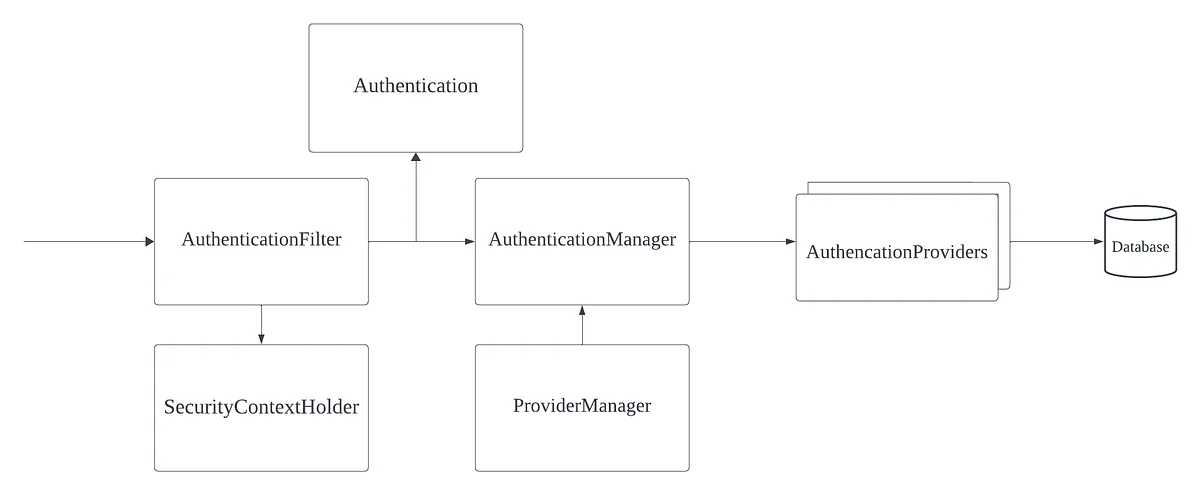
의존성을 추가하고 본격적으로 개발하기에 앞서 기본적인 Spring Security의 흐름에 대해서 알아야 합니다. Spring Security의 인증 과정은 약간은 복잡한 과정을 거치지만 (매우) 추상화된 다이어그램을 보면 이해하는 데 한층 더 도움이 됩니다.위의 다이어그램을 순서대로 확인하면
인증 과정을 확인해 보면 인증 과정을 커스터마이징하기 위해선 Authentication, AuthenticationProvider를 구현하여 인증 과정에 주입해야 함을 알 수 있게 됩니다.
Security Configuration설정
Spring Authorization server는 공식 document에서 인증 과정에 구현체를 설정하는 방법들과 예제를 제공합니다. 아래에 공식 document 예시가 나와있습니다.
@Bean
public SecurityFilterChain authorizationServerSecurityFilterChain(HttpSecurity http) throws Exception {
    OAuth2AuthorizationServerConfigurer authorizationServerConfigurer =
    new OAuth2AuthorizationServerConfigurer();
    http.apply(authorizationServerConfigurer);
    authorizationServerConfigurer
      .registeredClientRepository(registeredClientRepository)
      .authorizationService(authorizationService)
      .authorizationConsentService(authorizationConsentService)
      .authorizationServerSettings(authorizationServerSettings)
      .tokenGenerator(tokenGenerator)
      .clientAuthentication(clientAuthentication -> { })
      .authorizationEndpoint(authorizationEndpoint -> { })
      .deviceAuthorizationEndpoint(deviceAuthorizationEndpoint -> { })
      .deviceVerificationEndpoint(deviceVerificationEndpoint -> { })
      .tokenEndpoint(tokenEndpoint -> { })
      .tokenIntrospectionEndpoint(tokenIntrospectionEndpoint -> { })
      .tokenRevocationEndpoint(tokenRevocationEndpoint -> { })
      .authorizationServerMetadataEndpoint(authorizationServerMetadataEndpoint -> { })
      .oidc(oidc -> oidc
       .providerConfigurationEndpoint(providerConfigurationEndpoint -> { })
       .logoutEndpoint(logoutEndpoint -> { })
       .userInfoEndpoint(userInfoEndpoint -> { })
       .clientRegistrationEndpoint(clientRegistrationEndpoint -> { })
    );
   return http.build();
}
Configurer가 builder pattern을 이용하여 기본적으로 인증 과정을 지원하기 위한 많은 설정 방식을 지원하고 있습니다. 우리는 ROPC 프로토콜을 활용하여 토큰 생성 요청, 토큰 검증 요청을 커스터마이징 해야 하므로 위에서 2가지, tokenEndpoint와 tokenIntrospectionEndpoint를 설정할 예정입니다.
tokenEndpoint
@Bean
public SecurityFilterChain authorizationServerSecurityFilterChain(HttpSecurity http) throws Exception {
 OAuth2AuthorizationServerConfigurer authorizationServerConfigurer =
  new OAuth2AuthorizationServerConfigurer();
 http.apply(authorizationServerConfigurer);

 authorizationServerConfigurer
  .tokenEndpoint(tokenEndpoint ->
   tokenEndpoint
    .accessTokenRequestConverter(accessTokenRequestConverter)
    .accessTokenRequestConverters(accessTokenRequestConvertersConsumer)
    .authenticationProvider(authenticationProvider)
    .authenticationProviders(authenticationProvidersConsumer)
    .accessTokenResponseHandler(accessTokenResponseHandler)
    .errorResponseHandler(errorResponseHandler)
  );

 return http.build();
}
tokenEndpoint의 builder 예시입니다. Converter, Provider, Handler 등을 등록할 수 있는 것이 보입니다. 초기 개발에는 모든 handling을 converter와 provider에서 직접 수행할 예정이기 때문에 Converter와 Provider를 구현하여서 설정하면 됩니다.
tokenIntrospectionEndpoint
@Bean
public SecurityFilterChain authorizationServerSecurityFilterChain(HttpSecurity http) throws Exception {
 OAuth2AuthorizationServerConfigurer authorizationServerConfigurer =
  new OAuth2AuthorizationServerConfigurer();
 http.apply(authorizationServerConfigurer);

 authorizationServerConfigurer
  .tokenIntrospectionEndpoint(tokenIntrospectionEndpoint ->
   tokenIntrospectionEndpoint
    .introspectionRequestConverter(introspectionRequestConverter)
    .introspectionRequestConverters(introspectionRequestConvertersConsumer)
    .authenticationProvider(authenticationProvider)
    .authenticationProviders(authenticationProvidersConsumer)
    .introspectionResponseHandler(introspectionResponseHandler)
    .errorResponseHandler(errorResponseHandler)
  );

 return http.build();
}
tokenIntrospectionEndpoint는 기본적으로 tokenEndpoint와 유사하기 때문에 검증을 위한 Converter, Provider를 구현하여서 설정하면 됩니다. 공식 document에서 예제들은 Java를 기준으로 작성되어 있고, 우리는 kotlin을 사용하기 때문에 적절하게 컨버팅하여 코드를 작성하였습니다.
Configuration
    @Bean
    fun authorizationServerSecurityFilterChain(
        http: HttpSecurity,
        authorizationService: OAuth2AuthorizationService,
        authorizationContentService: OAuth2AuthorizationConsentService,
        tokenGenerator: OAuth2TokenGenerator<*>,
        userService: CustomAuthUserService,
        encoder: PasswordEncoder,
        registeredClientRepository: RegisteredClientRepository
    ): SecurityFilterChain? {
        val authorizationServerConfigurer = OAuth2AuthorizationServerConfigurer()
        authorizationServerConfigurer
            .tokenEndpoint { tokenEndpoint: OAuth2TokenEndpointConfigurer ->
                tokenEndpoint
                    .accessTokenRequestConverter(
                        CustomGrantAuthenticationConverter()
                    )
                    .authenticationProvider(
                        CustomGrantAuthenticationProvider(
                            authorizationService,
                            tokenGenerator,
                            userService
                        )
                    )
            }.tokenIntrospectionEndpoint { tokenIntrospectEndpoint ->
                tokenIntrospectEndpoint
                    .introspectionRequestConverter(CustomIntrospectAuthenticationConverter())
                    .authenticationProvider(
                        CustomIntrospectAuthenticationProvider(
                            authorizationService,
                            registeredClientRepository
                        )
                    )
            }

        val endpointsMatcher = authorizationServerConfigurer.endpointsMatcher
        http
            .securityMatcher(endpointsMatcher)
            .authorizeHttpRequests { authorize ->
                authorize
                    .requestMatchers(HttpMethod.GET, "/actuator/health").permitAll()
                    .requestMatchers(HttpMethod.GET, "/swagger-ui.html", "/swagger-ui/**", "/v3/api-docs/**")
                    .permitAll()
                    .requestMatchers(HttpMethod.POST, "/oauth2/introspect").permitAll()
                    .anyRequest().authenticated()
            }
            .csrf { csrf -> csrf.ignoringRequestMatchers(endpointsMatcher) }
            .apply(authorizationServerConfigurer)
        authorizationServerConfigurer
            .authorizationService(authorizationService)
            .authorizationConsentService(authorizationContentService)

        return http.build()
    }
위의 Configuration을 간략하게 설명하면
SecurityFilterChain에 설정한 구현체들이 설정되었습니다. 이제 실제 커스터마이징을 위한 Converter와 Provider들을 구현합니다.
CustomGrantAuthenticationConverter
class CustomGrantAuthenticationConverter : AuthenticationConverter {
    override fun convert(request: HttpServletRequest): Authentication? {
        // grant_type (REQUIRED)
        val grantType = request.getParameter(OAuth2ParameterNames.GRANT_TYPE)
        if (SecurityConfiguration.CUSTOM_GRANT_TYPE != grantType && SecurityConfiguration.REFRESH_TOKEN_GRANT_TYPE != grantType) {
            return null
        }
        val clientPrincipal = SecurityContextHolder.getContext().authentication
        val parameters: MultiValueMap<String, String> = getParameters(request)
        val additionalParameters: MutableMap<String, Any> = HashMap()
        parameters.forEach { (key: String, value: List<String>) ->
            if (key != OAuth2ParameterNames.GRANT_TYPE &&
                key != OAuth2ParameterNames.CLIENT_ID &&
                key != OAuth2ParameterNames.CODE &&
                key != OAuth2ParameterNames.CLIENT_SECRET
            ) {
                additionalParameters[key] = value[0]
            }
        }
        return CustomGrantAuthenticationToken(AuthorizationGrantType(grantType), clientPrincipal, additionalParameters)
    }
    private fun getParameters(request: HttpServletRequest): MultiValueMap<String, String> {
        val parameterMap = request.parameterMap
        val parameters: MultiValueMap<String, String> = LinkedMultiValueMap(parameterMap.size)
        parameterMap.forEach { (key: String, values: Array<String?>) ->
            if (values.isNotEmpty()) {
                for (value in values) {
                    parameters.add(key, value)
                }
            }
        }
        return parameters
    }
}
Converter에서는 Authentication이 위임되어 Provider로 전달하기 전 기본적인 요청 검증 및 변환을 수행하게끔 하였습니다. Grant Type을 기본 타입 외에 별도로 선언하였기에 Custom Grant Type, Refresh Token Grant type의 여부 정도만 확인하고 Provider 검증용으로 변환하여 OAuth2AuthorizationGrantAuthenticationToken을 구현한 CustomGrantAuthenticationToken으로 만들어 Provider로 전달합니다.
CustomGrantAuthenticationProvider
class CustomGrantAuthenticationProvider(
    private val authorizationService: OAuth2AuthorizationService,
    private val tokenGenerator: OAuth2TokenGenerator<out OAuth2Token>,
    private val userService: CustomAuthUserService
) : AuthenticationProvider {

    init {
        Assert.notNull(authorizationService, "authorizationService cannot be null")
        Assert.notNull(tokenGenerator, "tokenGenerator cannot be null")
    }

    @Throws(AuthenticationException::class)
    override fun authenticate(authentication: Authentication): Authentication {
        val customGrantAuthenticationToken: CustomGrantAuthenticationToken =
            authentication as CustomGrantAuthenticationToken

        val clientPrincipal = getAuthenticatedClientElseThrowInvalidClient(customGrantAuthenticationToken)
        val registeredClient = clientPrincipal.registeredClient

        if (!registeredClient!!.authorizationGrantTypes.contains(customGrantAuthenticationToken.grantType)) {
            throw OAuth2AuthenticationException(OAuth2ErrorCodes.UNAUTHORIZED_CLIENT)
        }
        val additionalParameters = customGrantAuthenticationToken.additionalParameters
        val scope = additionalParameters[OAuth2ParameterNames.SCOPE] as String?
        var userDetails: UserDetails? = null
        when (authentication.grantType.value) {
            SecurityConfiguration.CUSTOM_GRANT_TYPE -> {
                val username = additionalParameters[OAuth2ParameterNames.USERNAME] as String?
                    ?: throw OAuth2AuthenticationException("username not found.")
                val password = additionalParameters[OAuth2ParameterNames.PASSWORD] as String?
                    ?: throw OAuth2AuthenticationException("password not found.")

                userDetails = userService.loadUserByUsername(username, registeredClient.clientId)
                if (SecurityHelper.hashSHA512(password).trim() != (userDetails.password)) {
                    throw OAuth2AuthenticationException("password not matched.")
                }
            }

            SecurityConfiguration.REFRESH_TOKEN_GRANT_TYPE -> {
                val givenRefreshToken = additionalParameters[OAuth2ParameterNames.REFRESH_TOKEN] as String?
                authorizationService.findByToken(givenRefreshToken, OAuth2TokenType.REFRESH_TOKEN)
                    ?: throw OAuth2AuthenticationException("refresh token not matched.")
            }

            else -> throw OAuth2AuthenticationException("Not supported grant type.")
        }

        val tokenContext: OAuth2TokenContext = DefaultOAuth2TokenContext.builder()
            .registeredClient(registeredClient)
            .principal(clientPrincipal)
            .authorizationServerContext(AuthorizationServerContextHolder.getContext())
            .tokenType(OAuth2TokenType.ACCESS_TOKEN)
            .authorizationGrantType(customGrantAuthenticationToken.grantType)
            .authorizationGrant(customGrantAuthenticationToken)
            .authorizedScopes(setOf(scope))
            .build()
        userDetails?.let {
            (tokenGenerator as CustomDelegatingOAuth2TokenGenerator)
                .setCustomizer(
                    CustomDelegatingOAuth2TokenGenerator.GeneratorType.ACCESS_TOKEN,
                    CustomAccessTokenCustomizer((it as CustomUser))
                )
        }
        val generatedAccessToken = tokenGenerator.generate(tokenContext)
        if (generatedAccessToken == null) {
            val error = OAuth2Error(
                OAuth2ErrorCodes.SERVER_ERROR,
                "Token generator failed to generate the access token.",
                null
            )
            throw OAuth2AuthenticationException(error)
        }

        val accessToken = OAuth2AccessToken(
            OAuth2AccessToken.TokenType.BEARER,
            generatedAccessToken.tokenValue,
            generatedAccessToken.issuedAt,
            generatedAccessToken.expiresAt,
            setOf(scope)
        )
        val refreshTokenContext: OAuth2TokenContext = DefaultOAuth2TokenContext.builder()
            .registeredClient(registeredClient)
            .principal(clientPrincipal)
            .authorizationServerContext(AuthorizationServerContextHolder.getContext())
            .tokenType(OAuth2TokenType.REFRESH_TOKEN)
            .authorizationGrantType(customGrantAuthenticationToken.grantType)
            .authorizationGrant(customGrantAuthenticationToken)
            .authorizedScopes(setOf(scope))
            .build()
        val generatedRefreshToken = tokenGenerator.generate(refreshTokenContext)
        if (generatedRefreshToken == null) {
            val error = OAuth2Error(
                OAuth2ErrorCodes.SERVER_ERROR,
                "The token generator failed to generate the access token.",
                null
            )
            throw OAuth2AuthenticationException(error)
        }

        val refreshToken = OAuth2RefreshToken(
            generatedRefreshToken.tokenValue,
            generatedRefreshToken.issuedAt,
            generatedRefreshToken.expiresAt
        )

        val authorizationBuilder = OAuth2Authorization.withRegisteredClient(registeredClient)
            .principalName(clientPrincipal.name)
            .authorizationGrantType(customGrantAuthenticationToken.grantType)
        if (generatedAccessToken is ClaimAccessor) {
            authorizationBuilder.token(
                accessToken
            ) { metadata: MutableMap<String?, Any?> ->
                metadata[OAuth2Authorization.Token.CLAIMS_METADATA_NAME] =
                    (generatedAccessToken as ClaimAccessor).claims
            }.refreshToken(refreshToken).attribute("refresh_expires_in", refreshToken.expiresAt)
        } else {
            authorizationBuilder.accessToken(accessToken)
                .refreshToken(refreshToken).attribute("refresh_expires_in", refreshToken.expiresAt)
        }

        val authorization = authorizationBuilder.build()

        authorizationService.save(authorization)
        val attrib: MutableMap<String, Any?> = mutableMapOf(
            "refresh_expires_in" to refreshToken.expiresAt?.let {
                val currentInstant = Instant.now()
                val duration = Duration.between(currentInstant, it)
                duration.seconds
            }
        )
        userDetails?.let {
            attrib["x_custom_userinfo"] = (it as CustomUser).toDto()
        }
        return OAuth2AccessTokenAuthenticationToken(
            registeredClient,
            clientPrincipal,
            accessToken,
            refreshToken,
            attrib
        )
    }

    override fun supports(authentication: Class<*>): Boolean {
        return CustomGrantAuthenticationToken::class.java.isAssignableFrom(authentication)
    }

    private fun getAuthenticatedClientElseThrowInvalidClient(authentication: Authentication): OAuth2ClientAuthenticationToken {
        var clientPrincipal: OAuth2ClientAuthenticationToken? = null
        if (OAuth2ClientAuthenticationToken::class.java.isAssignableFrom(
                authentication.principal::class.java
            )
        ) {
            clientPrincipal = authentication.principal as OAuth2ClientAuthenticationToken?
        }
        if (clientPrincipal != null && clientPrincipal.isAuthenticated) {
            return clientPrincipal
        }
        throw OAuth2AuthenticationException(OAuth2ErrorCodes.INVALID_CLIENT)
    }
}
Provider 구현은 라이브러리에서 다양하게 제공하고 있는 여러 AuthenticationProvider 구현 클래스의 코드를 참조하면 어렵지 않게 구성할 수 있습니다. Provider는 검증 및 refresh 토큰 동시 발급, 기타 사용자 정보 주입 등의 내용들이 구현되어 있습니다. 큰 특이사항은 없으나 중요한 구현점이 하나 있습니다.
TokenGenerator 구현
userDetails?.let {
            (tokenGenerator as CustomDelegatingOAuth2TokenGenerator)
                .setCustomizer(
                    CustomDelegatingOAuth2TokenGenerator.GeneratorType.ACCESS_TOKEN,
                    CustomAccessTokenCustomizer((it as CustomUser))
                )
        }
OAuth2AccessTokenGenerator는 OAuth2TokenCustomizer의 구현체 리스트를 필드로 가지며 access token에 적절한 커스터마이징 작업을 수행할 수 있습니다. 하지만 문제는 Spring Authorization Server 가 사용하는 DelegatingOAuth2TokenGenator의 경우 OAuth2TokenCustomizer의 구현체를 동적으로 주입할 주입점이 없는 것이었습니다! (어떻게 쓰라고 있는겨.. 😂 ) Access token response 외에 별도로 Access token 정보에 취약하지 않은 기타 사용자 정보를 넣어 Resource API에서 활용하고 싶었기에, Customizer 주입이 가능한 TokenGenerator를 위에서 별도로 구현하여 주입하였습니다.
CustomDelegatingOAuth2TokenGenerator & CustomAccessTokenCustomizer
class CustomDelegatingOAuth2TokenGenerator<T : OAuth2Token>(
    vararg tokenGenerators: OAuth2TokenGenerator<out T>
) : OAuth2TokenGenerator<T> {

    private val tokenGenerators: List<OAuth2TokenGenerator<out T>>

    init {
        Assert.notEmpty(tokenGenerators, "tokenGenerators cannot be empty")
        Assert.noNullElements(tokenGenerators, "tokenGenerators cannot contain null elements")
        this.tokenGenerators = tokenGenerators.toList()
    }

    @Nullable
    override fun generate(context: OAuth2TokenContext): T? {
        for (tokenGenerator in this.tokenGenerators) {
            val token = tokenGenerator.generate(context)
            if (token != null) {
                return token
            }
        }
        return null
    }

    fun setCustomizer(type: GeneratorType, customizer: OAuth2TokenCustomizer<OAuth2TokenClaimsContext>) {
        when (type) {
            GeneratorType.ACCESS_TOKEN -> {
                for (tokenGenerator in this.tokenGenerators) {
                    if (tokenGenerator is OAuth2AccessTokenGenerator) {
                        tokenGenerator.setAccessTokenCustomizer(customizer)
                    }
                }
            }

            else -> {}
        }
    }

    enum class GeneratorType {
        ACCESS_TOKEN,
        REFRESH_TOKEN
    }
}
class CustomAccessTokenCustomizer(
private val customUser: CustomUser
) : OAuth2TokenCustomizer<OAuth2TokenClaimsContext> {
override fun customize(context: OAuth2TokenClaimsContext?) {
val claimsBuilder = context?.claims
claimsBuilder?.claim("x_custom_userinfo", customUser.toDto())
}
}Access token claims에 map 정보를 추가하도록 customizer를 만들어서 동적으로 claim을 주입할 수 있도록 구현하였습니다. Provider에서 검증 이후 setCustomizer를 호출하여 xcustomuserinfo 를 넣을 수 있게 되었습니다.
tokenIntrospectionEndpoint에도 유사한 방식으로 token 검증을 위한 CustomIntrospectAuthenticationConverter와 CustomIntrospectAuthenticationProvider를 구현하여 설정하면 기본적인 인증 서버를 구동시킬 준비가 완료됩니다.
scope 또는 권한 범위 설정 등의 나머지 과정들이 많이 남아있지만, 위의 과정을 거치면 개발팀에서 자체적으로 인증 프로토콜을 구성할 수 있게 됩니다.
반드시 주의해야 할 점은, 인증 커스터마이징은 공식 프로토콜을 준수하지 않게 되므로 보안 취약점 등을 개발팀에서 스스로 검증해야 한다는 것입니다. 꼼꼼한 코드 리뷰와 테스트를 반드시 거쳐야 상용환경에서 비로소 운영할 수 있게 됩니다.
마치며
레퍼런스가 많이 없는 상태에서 라이브러리를 하나씩 확인해 가면서 커스터마이징 하는 것이 조금 힘들었지만 레퍼런스가 없었기 때문에 오히려 더 자세히 공부할 수 있는 기회가 되었고, 기본적인 틀을 잡고 나니 Spring Security에 대해서 한층 더 명확하게 들여다볼 수 있었습니다. 뿐만 아니라 레퍼런스 부족으로 난관에 부딪혔거나 Spring security를 활용하여 국제 플랫폼 인증 구현, 타 기관 인증 결합 등 다양한 요구사항을 유연하게 수용하려는 개발자에게도 도움이 될 수 있을 것 같아 기쁘게 생각합니다. 그럼 글을 이만 마칩니다. 읽어주셔서 감사합니다.