Getting Started
Hello, I’m Juhwan Ma, a backend engineer at Riiid R.inside. As I recently had the opportunity to reorganize projects while working on a new B2B project, I ended up using the Spring Security OAuth2 Authorization Server library. I wrote this post in hopes that my experience and thoughts during the process may be helpful, and also for those who are interested in authorization servers.
Background for Implementing Spring Security Customization
The Challenges of Updating Spring Versions
Even after the release of Spring Boot 3.x, Spring 2.x is still the mainstream version in real-world production environments. From a practitioner’s perspective, version updates are quite troublesome, and updates are often avoided mainly for the following reasons.
However, as I was preparing for a new project, Spring Boot 2.x was nearing the end of its support period, and I felt that if I developed the new project in version 2 just out of inertia, it would only increase technical debt in the end. So I decided that the new project would proceed with kotlin 1.8.21 + spring boot 3.1.2 + JVM 17.
In the case of Riiid’s B2B projects, we separately operate an Authorization Server using Spring Security for user authentication. The Authorization Server is customized and used based on the OAuth2 protocol according to the product’s situation. Since the Front-end server, Authorization Server, and Resource Server are all configured within the same system, we had been providing customized Authorities and Roles based on ROPC (Resource Owner Password Credentials). The new project had the same environment configuration, so we intended to provide the authentication server in the same way, but the following issues arose.
While looking for alternatives to solve these issues, I decided to try using the Spring Security OAuth2 Authorization Server library, which reached GA 1.0 around the same time Spring Boot 3 was released. Since it had not been public for long, references were very limited, but because of GA + active communication + continuous updates and support + a willingness to update deprecated code, I decided to move forward with it.
However, the moment I added the dependency to apply the library and started development with the official documentation as a reference, a problem appeared. The GA library (Spring Boot Starter OAuth2 Authorization Server, which depends on Spring Security OAuth2 Authorization Server) follows the OAuth2.1 protocol as its standard, and in OAuth 2.1, ROPC (+ implicit grant) is not implemented at all. Although it is said to be a non-recommended spec, I thought, “Is it really impossible to implement in the first place?” So I searched around, and judging from opinions like “switch to the authorization code grant” and “I can’t accept that it was removed unilaterally,” it really seemed to be gone. (This is exactly why version upgrades become even harder, isn’t it..)
Get Maju’s stories in your inbox
However, this project still had requirements to implement the ROPC protocol, there was no reason to change the authentication protocol, and it needed to be used continuously, so I decided to implement everything needed for our product by customizing it on top of Spring Security’s basic architecture.
Implementing Spring Boot OAuth2 Authorization Server
Adding Dependencies
First, add the dependency so that Spring Boot OAuth2 Authorization Server can be used.
plugins {
    id("org.springframework.boot") version "3.1.2"
    id("io.spring.dependency-management") version "1.1.2"
    kotlin("jvm") version "1.8.21"
}
repositories {
    mavenCentral()
}
dependencies {
    implementation("org.springframework.boot:spring-boot-starter-web")
    implementation("org.springframework.boot:spring-boot-starter-actuator")
    implementation("org.springframework.boot:spring-boot-starter-data-jpa")
    /* .... */
    implementation("org.springframework.boot:spring-boot-starter-oauth2-authorization-server:3.1.2")
}
tasks {
    compileKotlin {
        kotlinOptions {
            freeCompilerArgs = listOf("-Xjsr305=strict", "-Xjvm-default=all-compatibility")
            jvmTarget = "17"
        }
        dependsOn(processResources)
    }
    compileTestKotlin {
        kotlinOptions {
            freeCompilerArgs = listOf("-Xjsr305=strict", "-Xjvm-default=all-compatibility")
            jvmTarget = "17"
        }
    }
    test {
        useJUnitPlatform()
    }
}
Spring Security Authentication Process
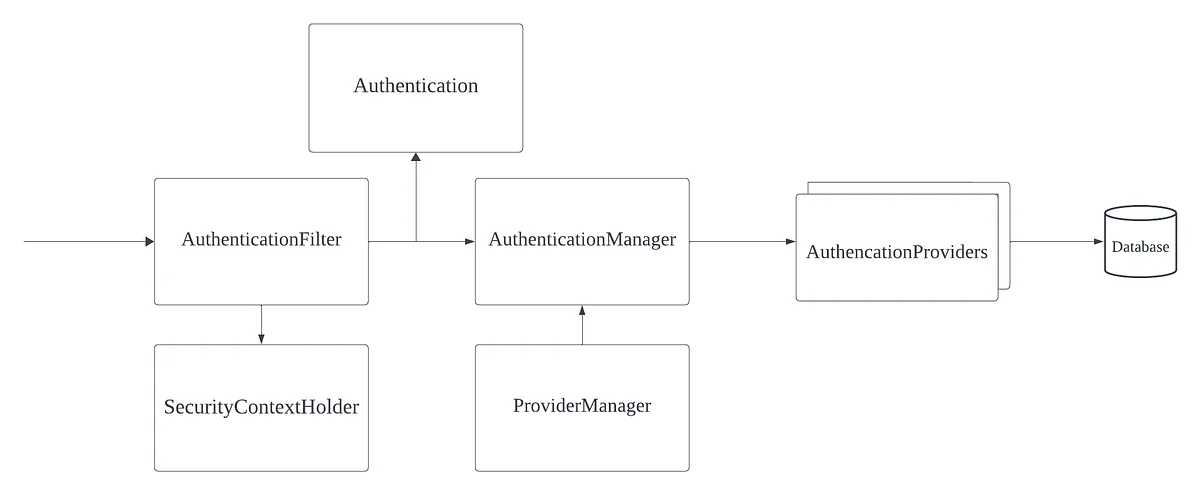
Before adding dependencies and starting development in earnest, you need to understand the basic flow of Spring Security. The authentication process in Spring Security goes through a somewhat complex process, but looking at a (highly) abstracted diagram helps make it much easier to understand. If you follow the diagram above in order:
Looking at the authentication process, you can see that in order to customize the authentication flow, you need to implement Authentication and AuthenticationProvider and inject them into the authentication process.
Security Configuration Setup
Spring Authorization Server provides methods and examples in the official documentation for configuring implementations in the authentication process. Below is an example from the official documentation.
@Bean
public SecurityFilterChain authorizationServerSecurityFilterChain(HttpSecurity http) throws Exception {
    OAuth2AuthorizationServerConfigurer authorizationServerConfigurer =
    new OAuth2AuthorizationServerConfigurer();
    http.apply(authorizationServerConfigurer);
    authorizationServerConfigurer
      .registeredClientRepository(registeredClientRepository)
      .authorizationService(authorizationService)
      .authorizationConsentService(authorizationConsentService)
      .authorizationServerSettings(authorizationServerSettings)
      .tokenGenerator(tokenGenerator)
      .clientAuthentication(clientAuthentication -> { })
      .authorizationEndpoint(authorizationEndpoint -> { })
      .deviceAuthorizationEndpoint(deviceAuthorizationEndpoint -> { })
      .deviceVerificationEndpoint(deviceVerificationEndpoint -> { })
      .tokenEndpoint(tokenEndpoint -> { })
      .tokenIntrospectionEndpoint(tokenIntrospectionEndpoint -> { })
      .tokenRevocationEndpoint(tokenRevocationEndpoint -> { })
      .authorizationServerMetadataEndpoint(authorizationServerMetadataEndpoint -> { })
      .oidc(oidc -> oidc
       .providerConfigurationEndpoint(providerConfigurationEndpoint -> { })
       .logoutEndpoint(logoutEndpoint -> { })
       .userInfoEndpoint(userInfoEndpoint -> { })
       .clientRegistrationEndpoint(clientRegistrationEndpoint -> { })
    );
   return http.build();
}
The Configurer supports many configuration methods by using the builder pattern to support the authentication process by default. Since we need to customize token generation requests and token validation requests using the ROPC protocol, we plan to configure the two above: tokenEndpoint and tokenIntrospectionEndpoint.
tokenEndpoint
@Bean
public SecurityFilterChain authorizationServerSecurityFilterChain(HttpSecurity http) throws Exception {
 OAuth2AuthorizationServerConfigurer authorizationServerConfigurer =
  new OAuth2AuthorizationServerConfigurer();
 http.apply(authorizationServerConfigurer);

 authorizationServerConfigurer
  .tokenEndpoint(tokenEndpoint ->
   tokenEndpoint
    .accessTokenRequestConverter(accessTokenRequestConverter)
    .accessTokenRequestConverters(accessTokenRequestConvertersConsumer)
    .authenticationProvider(authenticationProvider)
    .authenticationProviders(authenticationProvidersConsumer)
    .accessTokenResponseHandler(accessTokenResponseHandler)
    .errorResponseHandler(errorResponseHandler)
  );

 return http.build();
}
This is a builder example for tokenEndpoint. You can see that it allows you to register a Converter, Provider, Handler, and more. In the initial development phase, all handling will be performed directly in the converter and provider, so you can configure it by implementing the Converter and Provider.
tokenIntrospectionEndpoint
@Bean
public SecurityFilterChain authorizationServerSecurityFilterChain(HttpSecurity http) throws Exception {
 OAuth2AuthorizationServerConfigurer authorizationServerConfigurer =
  new OAuth2AuthorizationServerConfigurer();
 http.apply(authorizationServerConfigurer);

 authorizationServerConfigurer
  .tokenIntrospectionEndpoint(tokenIntrospectionEndpoint ->
   tokenIntrospectionEndpoint
    .introspectionRequestConverter(introspectionRequestConverter)
    .introspectionRequestConverters(introspectionRequestConvertersConsumer)
    .authenticationProvider(authenticationProvider)
    .authenticationProviders(authenticationProvidersConsumer)
    .introspectionResponseHandler(introspectionResponseHandler)
    .errorResponseHandler(errorResponseHandler)
  );

 return http.build();
}
'tokenIntrospectionEndpoint' is basically similar to tokenEndpoint, so you can configure it by implementing a Converter and Provider for validation. The examples in the official documentation are written in Java, and since we use Kotlin, we converted them appropriately and wrote the code.
Configuration
    @Bean
    fun authorizationServerSecurityFilterChain(
        http: HttpSecurity,
        authorizationService: OAuth2AuthorizationService,
        authorizationContentService: OAuth2AuthorizationConsentService,
        tokenGenerator: OAuth2TokenGenerator<*>,
        userService: CustomAuthUserService,
        encoder: PasswordEncoder,
        registeredClientRepository: RegisteredClientRepository
    ): SecurityFilterChain? {
        val authorizationServerConfigurer = OAuth2AuthorizationServerConfigurer()
        authorizationServerConfigurer
            .tokenEndpoint { tokenEndpoint: OAuth2TokenEndpointConfigurer ->
                tokenEndpoint
                    .accessTokenRequestConverter(
                        CustomGrantAuthenticationConverter()
                    )
                    .authenticationProvider(
                        CustomGrantAuthenticationProvider(
                            authorizationService,
                            tokenGenerator,
                            userService
                        )
                    )
            }.tokenIntrospectionEndpoint { tokenIntrospectEndpoint ->
                tokenIntrospectEndpoint
                    .introspectionRequestConverter(CustomIntrospectAuthenticationConverter())
                    .authenticationProvider(
                        CustomIntrospectAuthenticationProvider(
                            authorizationService,
                            registeredClientRepository
                        )
                    )
            }

        val endpointsMatcher = authorizationServerConfigurer.endpointsMatcher
        http
            .securityMatcher(endpointsMatcher)
            .authorizeHttpRequests { authorize ->
                authorize
                    .requestMatchers(HttpMethod.GET, "/actuator/health").permitAll()
                    .requestMatchers(HttpMethod.GET, "/swagger-ui.html", "/swagger-ui/**", "/v3/api-docs/**")
                    .permitAll()
                    .requestMatchers(HttpMethod.POST, "/oauth2/introspect").permitAll()
                    .anyRequest().authenticated()
            }
            .csrf { csrf -> csrf.ignoringRequestMatchers(endpointsMatcher) }
            .apply(authorizationServerConfigurer)
        authorizationServerConfigurer
            .authorizationService(authorizationService)
            .authorizationConsentService(authorizationContentService)

        return http.build()
    }
To briefly explain the Configuration above:
OAuth2AuthorizationService. It is responsible for storing and managing access tokens, and depending on your needs, you can use storage such as InMemory, Database, or Redis. You can also use an implementation provided by the library by default, but since an authentication server cluster must be configured during development, we connected an internal storage.OAuth2TokenGenerator. It uses DelegatingOAuth2TokenGenerator, which by default includes an access token generator, refresh token generator, and more, to generate tokens according to the request. It was implemented and injected separately to use the Customizer described later.UserDetailService. It is injected to access user information that will be used in actual authentication.InMemoryRegisteredClientRepository was registered as a Bean and injected.The implementations configured in SecurityFilterChain have now been set up. Next, we implement the actual Converter and Provider classes for customization.
CustomGrantAuthenticationConverter
class CustomGrantAuthenticationConverter : AuthenticationConverter {
    override fun convert(request: HttpServletRequest): Authentication? {
        // grant_type (REQUIRED)
        val grantType = request.getParameter(OAuth2ParameterNames.GRANT_TYPE)
        if (SecurityConfiguration.CUSTOM_GRANT_TYPE != grantType && SecurityConfiguration.REFRESH_TOKEN_GRANT_TYPE != grantType) {
            return null
        }
        val clientPrincipal = SecurityContextHolder.getContext().authentication
        val parameters: MultiValueMap<String, String> = getParameters(request)
        val additionalParameters: MutableMap<String, Any> = HashMap()
        parameters.forEach { (key: String, value: List<String>) ->
            if (key != OAuth2ParameterNames.GRANT_TYPE &&
                key != OAuth2ParameterNames.CLIENT_ID &&
                key != OAuth2ParameterNames.CODE &&
                key != OAuth2ParameterNames.CLIENT_SECRET
            ) {
                additionalParameters[key] = value[0]
            }
        }
        return CustomGrantAuthenticationToken(AuthorizationGrantType(grantType), clientPrincipal, additionalParameters)
    }
    private fun getParameters(request: HttpServletRequest): MultiValueMap<String, String> {
        val parameterMap = request.parameterMap
        val parameters: MultiValueMap<String, String> = LinkedMultiValueMap(parameterMap.size)
        parameterMap.forEach { (key: String, values: Array<String?>) ->
            if (values.isNotEmpty()) {
                for (value in values) {
                    parameters.add(key, value)
                }
            }
        }
        return parameters
    }
}
In the Converter, we configured it to perform basic request validation and transformation before the Authentication is delegated and passed to the Provider. Since the Grant Type was declared separately in addition to the default types, it only checks whether it is a Custom Grant Type or a Refresh Token Grant Type, then converts it for Provider validation and wraps it in CustomGrantAuthenticationToken, which implements OAuth2AuthorizationGrantAuthenticationToken, before passing it to the Provider.
CustomGrantAuthenticationProvider
class CustomGrantAuthenticationProvider(
    private val authorizationService: OAuth2AuthorizationService,
    private val tokenGenerator: OAuth2TokenGenerator<out OAuth2Token>,
    private val userService: CustomAuthUserService
) : AuthenticationProvider {

    init {
        Assert.notNull(authorizationService, "authorizationService cannot be null")
        Assert.notNull(tokenGenerator, "tokenGenerator cannot be null")
    }

    @Throws(AuthenticationException::class)
    override fun authenticate(authentication: Authentication): Authentication {
        val customGrantAuthenticationToken: CustomGrantAuthenticationToken =
            authentication as CustomGrantAuthenticationToken

        val clientPrincipal = getAuthenticatedClientElseThrowInvalidClient(customGrantAuthenticationToken)
        val registeredClient = clientPrincipal.registeredClient

        if (!registeredClient!!.authorizationGrantTypes.contains(customGrantAuthenticationToken.grantType)) {
            throw OAuth2AuthenticationException(OAuth2ErrorCodes.UNAUTHORIZED_CLIENT)
        }
        val additionalParameters = customGrantAuthenticationToken.additionalParameters
        val scope = additionalParameters[OAuth2ParameterNames.SCOPE] as String?
        var userDetails: UserDetails? = null
        when (authentication.grantType.value) {
            SecurityConfiguration.CUSTOM_GRANT_TYPE -> {
                val username = additionalParameters[OAuth2ParameterNames.USERNAME] as String?
                    ?: throw OAuth2AuthenticationException("username not found.")
                val password = additionalParameters[OAuth2ParameterNames.PASSWORD] as String?
                    ?: throw OAuth2AuthenticationException("password not found.")

                userDetails = userService.loadUserByUsername(username, registeredClient.clientId)
                if (SecurityHelper.hashSHA512(password).trim() != (userDetails.password)) {
                    throw OAuth2AuthenticationException("password not matched.")
                }
            }

            SecurityConfiguration.REFRESH_TOKEN_GRANT_TYPE -> {
                val givenRefreshToken = additionalParameters[OAuth2ParameterNames.REFRESH_TOKEN] as String?
                authorizationService.findByToken(givenRefreshToken, OAuth2TokenType.REFRESH_TOKEN)
                    ?: throw OAuth2AuthenticationException("refresh token not matched.")
            }

            else -> throw OAuth2AuthenticationException("Not supported grant type.")
        }

        val tokenContext: OAuth2TokenContext = DefaultOAuth2TokenContext.builder()
            .registeredClient(registeredClient)
            .principal(clientPrincipal)
            .authorizationServerContext(AuthorizationServerContextHolder.getContext())
            .tokenType(OAuth2TokenType.ACCESS_TOKEN)
            .authorizationGrantType(customGrantAuthenticationToken.grantType)
            .authorizationGrant(customGrantAuthenticationToken)
            .authorizedScopes(setOf(scope))
            .build()
        userDetails?.let {
            (tokenGenerator as CustomDelegatingOAuth2TokenGenerator)
                .setCustomizer(
                    CustomDelegatingOAuth2TokenGenerator.GeneratorType.ACCESS_TOKEN,
                    CustomAccessTokenCustomizer((it as CustomUser))
                )
        }
        val generatedAccessToken = tokenGenerator.generate(tokenContext)
        if (generatedAccessToken == null) {
            val error = OAuth2Error(
                OAuth2ErrorCodes.SERVER_ERROR,
                "Token generator failed to generate the access token.",
                null
            )
            throw OAuth2AuthenticationException(error)
        }

        val accessToken = OAuth2AccessToken(
            OAuth2AccessToken.TokenType.BEARER,
            generatedAccessToken.tokenValue,
            generatedAccessToken.issuedAt,
            generatedAccessToken.expiresAt,
            setOf(scope)
        )
        val refreshTokenContext: OAuth2TokenContext = DefaultOAuth2TokenContext.builder()
            .registeredClient(registeredClient)
            .principal(clientPrincipal)
            .authorizationServerContext(AuthorizationServerContextHolder.getContext())
            .tokenType(OAuth2TokenType.REFRESH_TOKEN)
            .authorizationGrantType(customGrantAuthenticationToken.grantType)
            .authorizationGrant(customGrantAuthenticationToken)
            .authorizedScopes(setOf(scope))
            .build()
        val generatedRefreshToken = tokenGenerator.generate(refreshTokenContext)
        if (generatedRefreshToken == null) {
            val error = OAuth2Error(
                OAuth2ErrorCodes.SERVER_ERROR,
                "The token generator failed to generate the access token.",
                null
            )
            throw OAuth2AuthenticationException(error)
        }

        val refreshToken = OAuth2RefreshToken(
            generatedRefreshToken.tokenValue,
            generatedRefreshToken.issuedAt,
            generatedRefreshToken.expiresAt
        )

        val authorizationBuilder = OAuth2Authorization.withRegisteredClient(registeredClient)
            .principalName(clientPrincipal.name)
            .authorizationGrantType(customGrantAuthenticationToken.grantType)
        if (generatedAccessToken is ClaimAccessor) {
            authorizationBuilder.token(
                accessToken
            ) { metadata: MutableMap<String?, Any?> ->
                metadata[OAuth2Authorization.Token.CLAIMS_METADATA_NAME] =
                    (generatedAccessToken as ClaimAccessor).claims
            }.refreshToken(refreshToken).attribute("refresh_expires_in", refreshToken.expiresAt)
        } else {
            authorizationBuilder.accessToken(accessToken)
                .refreshToken(refreshToken).attribute("refresh_expires_in", refreshToken.expiresAt)
        }

        val authorization = authorizationBuilder.build()

        authorizationService.save(authorization)
        val attrib: MutableMap<String, Any?> = mutableMapOf(
            "refresh_expires_in" to refreshToken.expiresAt?.let {
                val currentInstant = Instant.now()
                val duration = Duration.between(currentInstant, it)
                duration.seconds
            }
        )
        userDetails?.let {
            attrib["x_custom_userinfo"] = (it as CustomUser).toDto()
        }
        return OAuth2AccessTokenAuthenticationToken(
            registeredClient,
            clientPrincipal,
            accessToken,
            refreshToken,
            attrib
        )
    }

    override fun supports(authentication: Class<*>): Boolean {
        return CustomGrantAuthenticationToken::class.java.isAssignableFrom(authentication)
    }

    private fun getAuthenticatedClientElseThrowInvalidClient(authentication: Authentication): OAuth2ClientAuthenticationToken {
        var clientPrincipal: OAuth2ClientAuthenticationToken? = null
        if (OAuth2ClientAuthenticationToken::class.java.isAssignableFrom(
                authentication.principal::class.java
            )
        ) {
            clientPrincipal = authentication.principal as OAuth2ClientAuthenticationToken?
        }
        if (clientPrincipal != null && clientPrincipal.isAuthenticated) {
            return clientPrincipal
        }
        throw OAuth2AuthenticationException(OAuth2ErrorCodes.INVALID_CLIENT)
    }
}
The Provider implementation can be built without much difficulty by referring to the code of the various AuthenticationProvider implementation classes provided by the library. The Provider implements validation, simultaneous issuance of refresh tokens, injection of additional user information, and more. There are no major special points, but there is one important implementation detail.
TokenGenerator Implementation
userDetails?.let {
            (tokenGenerator as CustomDelegatingOAuth2TokenGenerator)
                .setCustomizer(
                    CustomDelegatingOAuth2TokenGenerator.GeneratorType.ACCESS_TOKEN,
                    CustomAccessTokenCustomizer((it as CustomUser))
                )
        }
OAuth2AccessTokenGenerator has a list of OAuth2TokenCustomizer implementations as a field and can perform appropriate customization on the access token. However, the problem was that in the case of DelegatingOAuth2TokenGenator used by Spring Authorization Server, there was no injection point for dynamically injecting OAuth2TokenCustomizer implementations! (How are you supposed to use this.. 😂 ) Since I wanted to include other user information in the Access token response that would not be sensitive in the Access token itself and use it in the Resource API, I separately implemented and injected a TokenGenerator that supports Customizer injection as shown above.
CustomDelegatingOAuth2TokenGenerator & CustomAccessTokenCustomizer
class CustomDelegatingOAuth2TokenGenerator<T : OAuth2Token>(
    vararg tokenGenerators: OAuth2TokenGenerator<out T>
) : OAuth2TokenGenerator<T> {

    private val tokenGenerators: List<OAuth2TokenGenerator<out T>>

    init {
        Assert.notEmpty(tokenGenerators, "tokenGenerators cannot be empty")
        Assert.noNullElements(tokenGenerators, "tokenGenerators cannot contain null elements")
        this.tokenGenerators = tokenGenerators.toList()
    }

    @Nullable
    override fun generate(context: OAuth2TokenContext): T? {
        for (tokenGenerator in this.tokenGenerators) {
            val token = tokenGenerator.generate(context)
            if (token != null) {
                return token
            }
        }
        return null
    }

    fun setCustomizer(type: GeneratorType, customizer: OAuth2TokenCustomizer<OAuth2TokenClaimsContext>) {
        when (type) {
            GeneratorType.ACCESS_TOKEN -> {
                for (tokenGenerator in this.tokenGenerators) {
                    if (tokenGenerator is OAuth2AccessTokenGenerator) {
                        tokenGenerator.setAccessTokenCustomizer(customizer)
                    }
                }
            }

            else -> {}
        }
    }

    enum class GeneratorType {
        ACCESS_TOKEN,
        REFRESH_TOKEN
    }
}
class CustomAccessTokenCustomizer(
private val customUser: CustomUser
) : OAuth2TokenCustomizer<OAuth2TokenClaimsContext> {
override fun customize(context: OAuth2TokenClaimsContext?) {
val claimsBuilder = context?.claims
claimsBuilder?.claim("x_custom_userinfo", customUser.toDto())
}
}We created a customizer to add map information to access token claims, enabling dynamic claim injection. After validation in the Provider, it became possible to call setCustomizer and include xcustomuserinfo.
tokenIntrospectionEndpoint can also be configured in a similar way by implementing CustomIntrospectAuthenticationConverter and CustomIntrospectAuthenticationProvider for token validation, which completes the basic preparation needed to run an authorization server.
Although many remaining steps still exist, such as scope or permission range configuration, going through the process above allows the development team to build its own authentication protocol.
One point that absolutely requires caution is that authentication customization means not adhering to the official protocol, so the development team must verify security vulnerabilities and similar issues on its own. Only after thorough code review and testing can it finally be operated in a production environment.
Wrapping Up
Although it was a bit difficult to customize things by checking the libraries one by one in a situation with not many references available, the lack of references actually became an opportunity to study things in greater detail. Once the basic framework was established, I was able to look into Spring Security with much greater clarity. In addition, I am glad that this may also help developers who have run into difficulties due to a lack of references or who are trying to flexibly accommodate various requirements using Spring Security, such as implementing authentication for global platforms or integrating authentication from other institutions. With that, I will conclude this article here. Thank you for reading.